This error would appear in the system log of the server almost everyday in the morning - HP NC373i: The network link is down . Never during the day such as late afternoon or evening. The error would occur early in the am hours juts before and at times when employees juts start reporting to work. Event id4, source l2nd.
Providing some examples, industry news, information snippets of computer support technology. From fine print to big PR releases, everyone has to deal and cope with it - SUPPORT.
Thursday, December 02, 2010
HP NC373i: The network link is down
This error would appear in the system log of the server almost everyday in the morning - HP NC373i: The network link is down . Never during the day such as late afternoon or evening. The error would occur early in the am hours juts before and at times when employees juts start reporting to work. Event id4, source l2nd.
Thursday, December 31, 2009
Supporting Technology with Technology.: Enable 24 bit color in RDP for XP or 2003 Server
The option to connect to XP systems or windows 2003 servers with a color depth higher than 16 bits is available to be selected as an option before connecting to the remote computer. However, the RDP connection is never made at a color depth higher that 16 bits to neither a windows 2003 server or an XP desktop. There is a way to connect with true color 24 bit using rdp to XP or windows 2003 server.
Tuesday, November 24, 2009
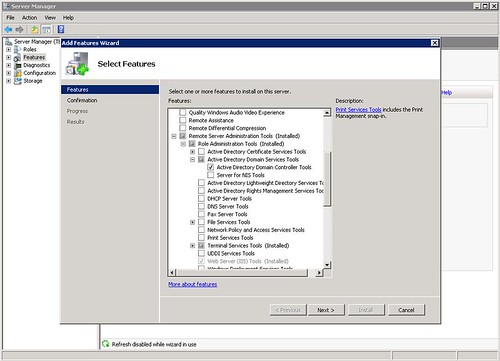
Adding dsa.msc on Windows 2008 Server
How to add dsa.msc to windows 2008 server
If you wanted to access active directory users and computers from a member 2003 server it was as easy as clicking start run then entering dsa.msc in the box and click open. That little useful feature is not added into a default 2008 server installation it needs to be added during the initial installation of the server or afterwards by adding a feature. The image in this post shows what options to select to add the dsa.msc command back into your member server. For people who use this a lot it's quite worth the several minutes to install. Adding the feature does not require a reboot.
Friday, October 23, 2009
Dell SAS 6iR Plug-in card, PCI Express x8, 2 CH, PC, Unix

Dell SAS6/iR Integrated SAS Controller Card Storage controller (RAID)- Serial ATA-300 / SAS- 300 MBps - Plug-in card, PCI Express x8, 2 CH, PC, Unix .
This RAID controller card from Dell only supports RAID 0 and RAID 1. It support 2 hot swap drives and has a combined 12Gbps throughput from 4 channels at 3Gbps. It's not a bad controller card for entry level servers and workstations but one of it's limitations is that it does not support RAID 5 or RAID 10 (RAID 0 + 1). I discovered this unfortunately when trying to configured RAID 10 (RAID 0 +1) in a PowerEdge r610 server.
Dell Storage Controllers
Desktop and server remote access support software
Monday, October 13, 2008
Configure RDP Port Forwarding on a Cisco ASA 5505
For those of you searching the Internet to try and find a good or simple example of how port forwarding is done on a Cisco ASA 5500 series firewall (in this example, it is a Cisco ASA 5505 version 7.2) This post contains a working example of a port forwarding configuration on a Cisco ASA 5505 that's allowing RDP, TCP port 3389, through the firewall to from the Internet to the LAN side to a server. For new users to the ASA, how to configure a port forwarding rule on a Cisco ASA 5505 can be a more easily accomplished if the working configuration of a working ASA5505 is viewed. For many of the more seasoned users of the Cisco security appliance, port forwarding is very easy and need not be searching for answers.Since the RDP protocol and the services running on windows XP and Vista client machines are derivatives of Microsoft's Terminal Server, the proceedure for setting up a port forward configuration for Microsoft terminal server is the same. The Cisco ASA5505 is not concerned what you are connecting to behind it, it's just concerned that its own configuration allows the right data and connection to go through.
Below is a GUI shot of a working RDP (Terminal Server) port forward configuration running on a Cisco ASA 5500 series firewall. The TCP port number 3398 is forwarded from the outside interface that's part of VLAN2 to the inside interface that's part of the VLAN1.
!
interface Vlan1 nameif
inside security-level 100
ip address 192.168.1.1 255.255.255.0
!
interface Vlan2 nameif
outside security-level 0
ip address dhcp setroute
Using the example below, just swap out the ip addresses shown in the static NAT translation for port forwarding RDP (terminal Server) with your own and you have a connection from the Internet to the LAN.
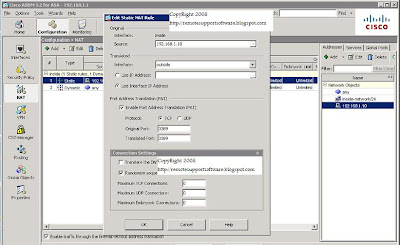

If you prefer command line, it's three lines of code at the command line that will do a simple port forwarding for RDP on the Cisco ASA.
Here they are:
access-list outside_access_in extended permit tcp any interface outside eq 3389
static (inside,outside) tcp interface 3389 192.168.1.10 3389 netmask 255.255.255.255
access-group outside_access_in in interface outside
Obviously, if you are looking to use the lines of code shown in the example above, change the 192.168.1.10 ip address shown above to be the address of the computer or server your forwarding RDP (terminal server) port to connect to. You can essentially use this example for terminal server RDP or for any other forwarding requirement you may have like ftp, http,smtp, etc.
Link to this post:
http://remotesupportsoftware.blogspot.com/2008/10/configure-rdp-port-forwarding-on-cisco.html
Link to this blog:
http://remotesupportsoftware.blogspot.com