
Showing posts with label windows. Show all posts

Thursday, December 02, 2010

HP NC373i: The network link is down


Share/Save/Bookmark

This error would appear in the system log of the server almost everyday in the morning - HP NC373i: The network link is down . Never during the day such as late afternoon or evening. The error would occur early in the am hours juts before and at times when employees juts start reporting to work. Event id4, source l2nd.
The driver version was not updated yet. The possible solution is checking and disabling power save mode for the NIC. The server was running windows 2003 server standard edition on an HP Proliant series server hardware platform. The next step will be to update the driver version. There have been TCP offload problems with some drivers. The version installed on this server was fairy new but an update was available.

Thursday, December 31, 2009

Supporting Technology with Technology.: Enable 24 bit color in RDP for XP or 2003 Server


Supporting Technology with Technology.: Enable 24 bit color in RDP for XP or 2003 Server

The option to connect to XP systems or windows 2003 servers with a color depth higher than 16 bits is available to be selected as an option before connecting to the remote computer. However, the RDP connection is never made at a color depth higher that 16 bits to neither a windows 2003 server or an XP desktop. There is a way to connect with true color 24 bit using rdp to XP or windows 2003 server.
A pre-defined default limit on the remote XP or windows 2003 server limits the color depth of RDP connections to 16 bit maximum on XP or windows 2003 server but can be changed to 24 bit true color by using group policy o nthe rmote computer or for all computers in a windows domain by linking a GPO to an OU or domain. How to configure the "server side" of remote desktop to accept connections at 24-bit true color.

Monday, October 13, 2008

Configure RDP Port Forwarding on a Cisco ASA 5505

Share/Save/Bookmark


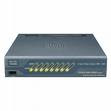
Cisco ASA5505
For those of you searching the Internet to try and find a good or simple example of how port forwarding is done on a Cisco ASA 5500 series firewall (in this example, it is a Cisco ASA 5505 version 7.2) This post contains a working example of a port forwarding configuration on a Cisco ASA 5505 that's allowing RDP, TCP port 3389, through the firewall to from the Internet to the LAN side to a server. For new users to the ASA, how to configure a port forwarding rule on a Cisco ASA 5505 can be a more easily accomplished if the working configuration of a working ASA5505 is viewed. For many of the more seasoned users of the Cisco security appliance, port forwarding is very easy and need not be searching for answers.

Since the RDP protocol and the services running on windows XP and Vista client machines are derivatives of Microsoft's Terminal Server, the proceedure for setting up a port forward configuration for Microsoft terminal server is the same. The Cisco ASA5505 is not concerned what you are connecting to behind it, it's just concerned that its own configuration allows the right data and connection to go through.

Below is a GUI shot of a working RDP (Terminal Server) port forward configuration running on a Cisco ASA 5500 series firewall. The TCP port number 3398 is forwarded from the outside interface that's part of VLAN2 to the inside interface that's part of the VLAN1.

!
interface Vlan1 nameif
inside security-level 100
ip address 192.168.1.1 255.255.255.0
!
interface Vlan2 nameif
outside security-level 0
ip address dhcp setroute

Using the example below, just swap out the ip addresses shown in the static NAT translation for port forwarding RDP (terminal Server) with your own and you have a connection from the Internet to the LAN.
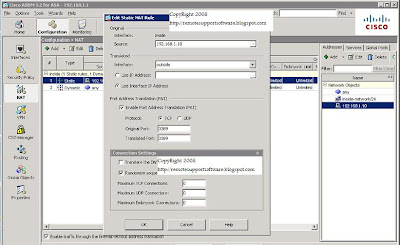


If you prefer command line, it's three lines of code at the command line that will do a simple port forwarding for RDP on the Cisco ASA.

Here they are:

access-list outside_access_in extended permit tcp any interface outside eq 3389
static (inside,outside) tcp interface 3389 192.168.1.10 3389 netmask 255.255.255.255
access-group outside_access_in in interface outside

Obviously, if you are looking to use the lines of code shown in the example above, change the 192.168.1.10 ip address shown above to be the address of the computer or server your forwarding RDP (terminal server) port to connect to. You can essentially use this example for terminal server RDP or for any other forwarding requirement you may have like ftp, http,smtp, etc.


Link to this post:

http://remotesupportsoftware.blogspot.com/2008/10/configure-rdp-port-forwarding-on-cisco.html

Link to this blog:

http://remotesupportsoftware.blogspot.com


Thursday, May 15, 2008

Service Pack 3 Doesn't Install IE7

The fact that SP3 for XP doesn't install IE7 was a very good decision made by Microsoft. There are still too many applications that rely on IE7 and would break if installed with an update.


XPSP3 is just over 300 MB. This is a nice sized download and contains all previous hotfixes after SP2.


List of fixes:


Tuesday, May 13, 2008

Catastrophic Failure Message Display During Installation


Catastrophic failure for feature mini driver when installing, re-installing or removing the Fujitsu Windows scanning software.
If you get this message, while trying to install or remove the software from a desktop then open registry editor and do a search for the string windows scanning. Rename or remove the keys for these entries and especially the ones that have to do with the list of installed applications. The goal is to make Windows XP believe that this software is not already installed. Once this is complete then try installing the software again.
I had experienced this message while working with a fujitsu 5120 scanner. In windows, the scanner comes up as a fi-5120Cdj scanner and is popular with many medical manager applications.

Saturday, April 08, 2006

Windows 12 Release Delayed

Windows Vista Release Delayed It's so common that Microsoft delays their releases. I could remember going as far back as the first windows 95 release date. It was postponed several times. At this point, whatever I hear or read as the release date, I tack on 6 months to a year. it may just be a well used and repeated marketing mechanism. For each delay there's an announcement and the buzz kicks about around all circles not just tech support rings. these delays resonate up the ranks to individuals who are making business and budget decisions (that's not to say tech-heads don't do those sort of things). Businesses make decisions on the deployment of computers depending on release dates of windows OSes. I am certainly sure of this as one of my company's customers is waiting for the release of Vista before making a substantial purchase of new desktops.

Online PC remote support software

Remote Support Software

If I'm not mistaken, I believe the next Microsoft Server OS is called longhorn. One of the key changes in the networking subsystem is the total integration or "built-in-ness" of IPV6 for both vista and longhorn (server and desktop). Vista is, as I last heard and looked it up, due to be released in January of '07. As far as the next server release, those release delays are even more prevalent with the Server OSes so until the due day is just a month or two a way, actually a week or two, it's hard to believe it will be released when expected.

Monday, December 26, 2005

PC Remote Maintenance: Tele-Fix Corporation's New PC Remote Maintenance (PCRM) Product that Enable Next-Generation Remote Service (by Phone or Net) and User Support

ST. LOUIS, MO -- June 7, 2002 -- In a move designed to lead the Remote Service and Support of computer users, Tele-Fix Corporation announced a new hardware and software for taking control of remote computers today. This is completed by using the PCRM Internal PC Card or External device for Remote Installation and Maintenance of BIOS, Operating-Systems and User Applications.

Whether you support Servers or PCs, for customers, or for friends, this PCRM will lead the support in remote control solutions with new features for greater security, easier use, and increased customizability.

Remote Support On The Web


Full remote support capabilities

Bios level support, Communications definitions and failures support, Hard disc formatting, Windows, Linux or any other Operating System installation, support and maintenance, Web access definitions and more.


More...